top of page


Service at 9:30AM Sundays
Pastor Lana Robyne
255 W. 2nd Street
Manteno, IL 60950
815-468-3722


How to setup Online Raise Right
Step 1: Download the Raise Right app on your mobile device or tablet.


Step 2: Enter your email in the app or scan the QR Code below. Enter your email and press "Get Started".


Step 3: Create your Account by entering your first and last name. Leave the other two boxes under" Who are you earning for?" blank. Press "Next"

Step 4: If you used the QR Code, the Enrollment Code will be auto-filled. If you didn't, you'll need to enter E6BEF3LA63681 in the Enrollment Code box. Then, create and confirm your password and click "Next".

Step 5. Complete the security questions in the next two steps.
Step 6. You're good to go! You'll want to add a payment method by clicking your account picture on the upper right. Then select "Settings", then "Payment Options"
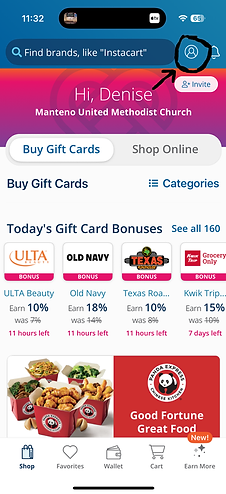

You'll notice on the main page you can "Buy Gift Cards" or "Shop Online". When you are at a store, you can buy a gift card through the app, add money to it, and then use your phone for payment. You'll need to enter the Access Code listed from your phone when prompted.


bottom of page